
Edge AI video surveillance analyzes camera footage on a local device, such as an AI-enabled recorder or edge computer, instead of sending every stream to a remote server. The device decodes the video, runs AI models to detect objects or events, and stores or forwards only what matters.
For years, the network video recorder (NVR) had one job: to record. Today, organizations expect their video systems to understand what they record. With intelligent video analytics running at the edge, cameras can detect events as they occur, trigger alerts, and turn video into data that other systems can use.
Key takeaways
- Edge AI video surveillance runs video analysis locally, which reduces latency, bandwidth use and cloud dependence.
- It applies well beyond security: industrial sites, smart buildings, retail and traffic monitoring all use it.
- An AI NVR is one common hardware form. It records like a traditional NVR and adds on-device analysis.
- When choosing hardware, check decoding capacity and AI capacity separately. They are different numbers.
- Always test with your own models and footage before scaling.
How edge AI video surveillance works
A local device handles the whole pipeline:
- Video input. The device receives streams from IP cameras over the network.
- Decoding. Compressed video, commonly H.264 or H.265, is turned into frames.
- Pre-processing. Frames are resized or converted to the format a model expects.
- Inference. An AI model running on a CPU, GPU or NPU detects objects, classifies scenes or recognizes patterns.
- Events and storage. Results become alerts, metadata or triggered recordings, and video is stored locally or forwarded as needed.
Why analytics is moving to the edge
- Lower latency. There is no round trip to a remote server, which matters when an alert must trigger an action immediately.
- Lower bandwidth and cost. Only events, metadata or selected clips need to leave the site.
- More data control. Raw footage that includes people and private areas can stay on-premises.
- Better resilience. Analysis and recording can continue when connectivity is limited.
- Easier multi-site scaling. Each location analyzes its own video instead of centralizing every stream.
Where it is used
The cameras may look alike, but each application has different detection tasks and hardware needs.
| Application | Typical analytics | Hardware to check |
|---|---|---|
| Smart security systems | Intrusion, person and vehicle detection, perimeter alerts | Multi-camera decoding, 24/7 stability, local storage |
| Intelligent video analytics platforms | Object detection, tracking, event search, metadata | Model and framework support, inference throughput |
| Industrial surveillance | Restricted-area detection, safety zones, process observation | Temperature range, serial and I/O interfaces, runtime |
| Smart buildings | Access area monitoring, occupancy awareness, after-hours detection | Network options, compact size, local processing |
| Retail security | Foot traffic, queue detection, loss-prevention alerts | Many streams per site, local data handling |
| Traffic monitoring | Vehicle counting, incident and congestion detection | Decoding capacity, communications, deployment environment |
AI NVR vs traditional NVR
An AI NVR keeps the recording function of a traditional NVR and adds on-device analysis.
| Traditional NVR | AI NVR | |
|---|---|---|
| Main function | Record and play back | Record, analyze and flag events |
| Event detection | Basic motion detection | Object and event detection with AI models |
| Searching footage | Mostly by time | By detected objects or events, when metadata is stored |
| Compute needs | Decoding and storage | Decoding, storage and AI inference |
An AI NVR is not the only option. Some projects add a separate edge AI box next to an existing recorder, and others build analytics into a custom product. The right choice depends on whether you are upgrading an existing system or designing a new one.
How to choose hardware for edge AI video analytics
Check these seven areas together:
- Video decoding. Every stream must be decoded before analysis. Camera count, resolution, frame rate and codec set the baseline load.
- AI inference. Demand depends on the model, input resolution, how often frames are analyzed and how many streams are processed.
- Memory. Decoding, pre-processing and inference compete for memory bandwidth, so memory can become the bottleneck before compute does.
- Storage. Interfaces and capacity should match your retention requirements.
- Network. Check Ethernet ports, wireless options and whether cellular backup is needed.
- Continuous operation. Look for a watchdog timer, real-time clock and an operating temperature range that suits the site.
- Software support. Confirm the operating systems and AI frameworks supported, and how models are deployed to the device.
Remember: Decoding capacity is how many streams a device can process. AI capacity is how many of those it can analyze with your model and settings. The second number is usually lower, and a TOPS rating alone does not predict it.
Some platforms include an NPU or an optional accelerator module. Whether you need one depends on your models and stream count. Our M.2 accelerator comparison covers the trade-offs.
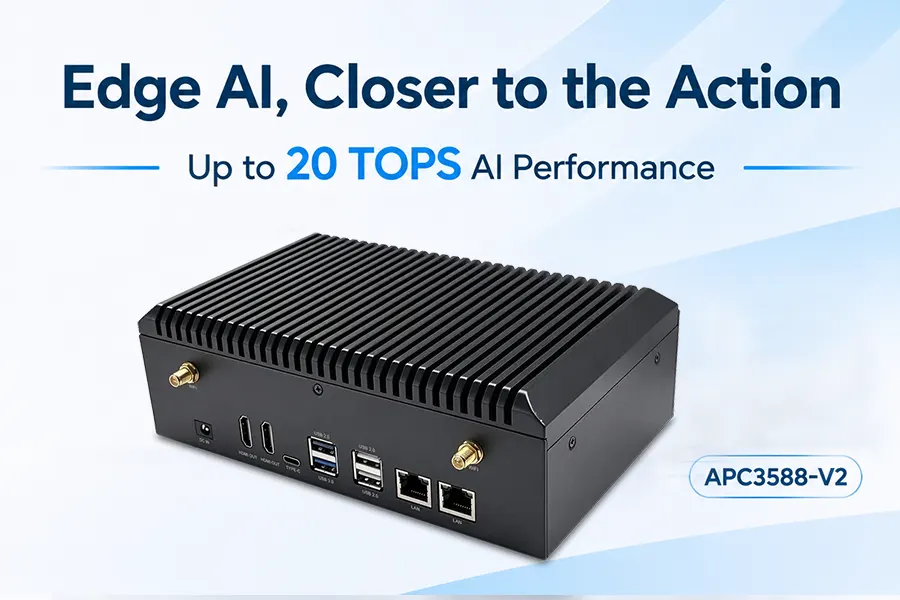
Example: APC3588-V2
Geniatech’s APC3588-V2 is an edge AI computing box designed for AI NVR, industrial control and digital signage. Key specifications for video analytics:
| Item | Specification |
|---|---|
| Processor | Rockchip RK3588 octa-core, up to 2.4 GHz |
| AI compute | RK3588 NPU up to 6 TOPS; optional RK1828 accelerator up to 20 TOPS (INT8) |
| Video decoding | Up to 32 channels of 1080p at 30 fps; up to 8K@60 (H.265 / VP9 / AVS2) |
| Memory and storage | 4 GB / 64 GB default; up to 32 GB / 256 GB optional |
| Network | 2× Gigabit Ethernet, Wi-Fi 6, optional 4G/5G, optional PoE |
| Storage interfaces | SATA, M.2 |
| Operating system | Android 14, Debian 11, Buildroot |
| AI frameworks | TensorFlow, PyTorch, Caffe, MXNet |
| Reliability | Built-in watchdog and RTC; 0°C to 60°C (commercial) or -40°C to 85°C (industrial) |
The RK1828 accelerator is optional and configuration dependent, and the HDMI input is not populated by default when it is installed. Actual AI performance depends on the model, resolution, frame rate and system configuration, so validate your own workload during evaluation.
Frequently asked questions
What is the difference between an AI NVR and a traditional NVR?
A traditional NVR records and plays back video. An AI NVR adds on-device analysis, so it can detect objects and events, trigger alerts and support event-based search.
How many cameras can an AI NVR support?
Check two numbers: how many streams it can decode, and how many it can analyze with AI at your chosen model, resolution and frame rate. The second is usually lower and should be tested with your own workload.
Is intelligent video analytics the same as edge AI?
Not exactly. Intelligent video analytics describes analyzing video with AI. Edge AI describes where that analysis runs. Analytics can run at the edge, in the cloud, or in a mix of both.
Can I add AI to an existing recorder?
Often the recorder lacks the compute for inference. A common upgrade path is adding an edge AI device that processes streams alongside it.
Does it work without internet?
Analysis and recording can run locally without a constant connection. Remote management, updates and cloud features need connectivity.
Conclusion
Edge AI video surveillance moves cameras from recording to real-time understanding. The technology fits security, industrial sites, buildings, retail and traffic, but each has its own demands for decoding, inference, storage and reliability. Choose hardware by looking past a single performance number, and test against your own workload.
To discuss a video analytics project, contact the Geniatech team.